NEW CUSTOMERS
Welcome to Clean Cut Energy!
If you live in a condo or building using Clean Cut Energy utility services, you are in the right place! To use our services, you must set up an account. See below for instructions.

NEW CUSTOMERS
If you live in a condo or building using Clean Cut Energy utility services, you are in the right place! To use our services, you must set up an account. See below for instructions.
Condo developments will typically receive one big bill for all utility use in the condo complex and that bill is then divided and charged equality to the occupants of the units. With submetering, each unit has its own meter and is billed directly only for what they use!
Please note we have a Tenant PAD Policy which requires all new Tenants to be on PAD payment.
Please ensure you complete the PAD Authorization Form (click the button below to download) and email it to along with your banking information (picture of a void cheque or PAD form from your bank) in order to have your new account request processed.
Please note that we do not accept payments through the online account portal.
Go to the following website link: my.cleancutenergy.ca
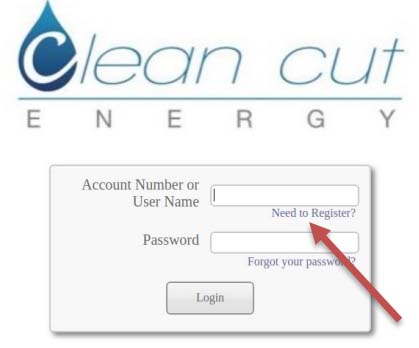
Enter your account number in the “Account Number or User Name” field then click the “Need to Register?” button. See example below.
Enter your account number, your email address, and the verification code then click the “Register” button. See example below.
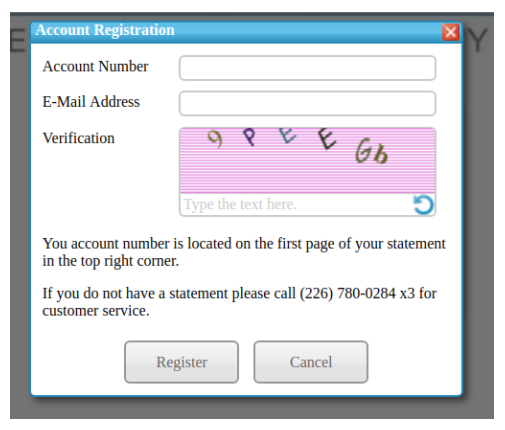
The system will send an email with instructions and a temporary password to your email.
Note: The system may take several minutes to send you the email. Only complete a new account registration once. If you do not receive the email, please contact us at welcome@cleancutenergy.ca.
Login to your online account using the temporary password from the email you received. You can then update your password.